Client files, credentials and sign-off, without the email trail.
One secure workspace per client for onboarding documents, network diagrams, change approvals and signed agreements. Send passwords with Secure Drop instead of email or chat.
We run our own MSP on it.
ITAssurance, our sister managed IT company, uses MyDocUploads for its own client document work. The problems it solves are the ones an MSP sees every week.
How an MSP uses it.
- Onboarding: one workspace per client, with the onboarding checklist, network diagram and agreement in one place.
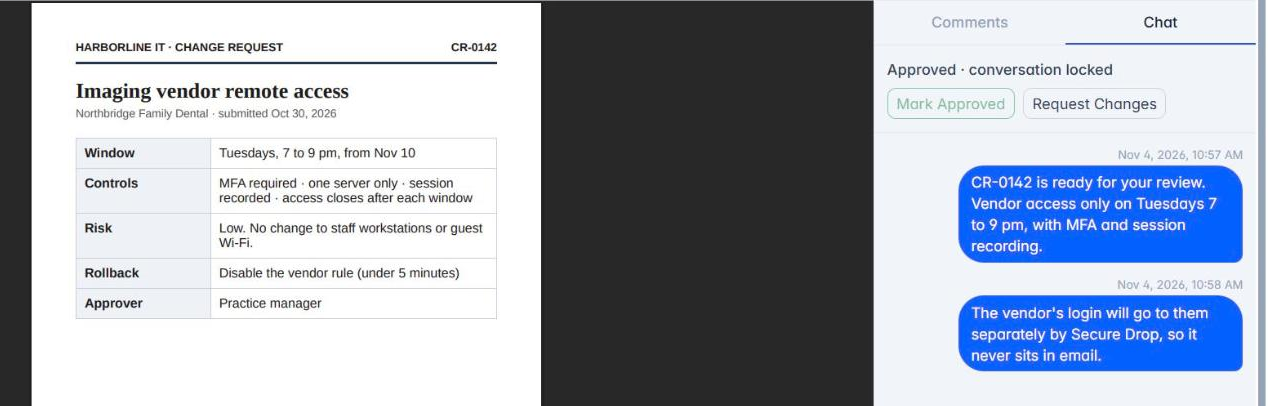
- Credentials: send a temporary password or recovery code with Secure Drop. It's encrypted and disappears after the views you set, instead of sitting in a ticket or an inbox.
- Change requests: share the change request PDF and get Mark Approved on the file, so there is a record of who agreed and when.
- Agreements: send the managed services agreement for signature with Sign.
- Intake: start from the Consulting engagement intake template or a blank form.
Questions, answered.
- Does MyDocUploads replace my PSA or ticketing system?
- No. It holds the documents, credentials and approvals that go with your client work. Keep your PSA for tickets and billing.
- Do my clients need an account?
- No. They use secure links to upload, read a Secure Drop, sign or fill in a form.
- Is there an MSP form template?
- Not a dedicated one yet. Start from Consulting engagement intake or build your own form.