Tax season, without the inbox.
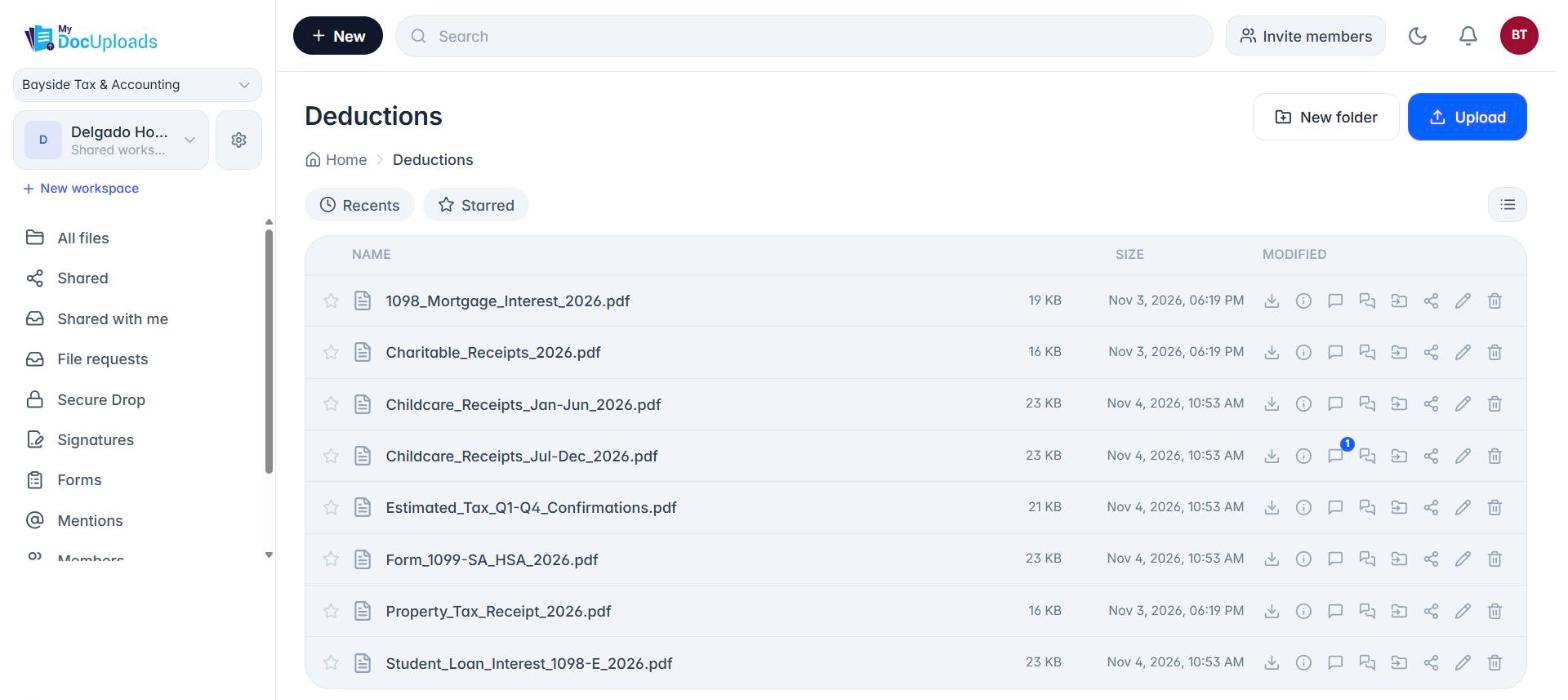
One secure workspace per client. Request every W-2, 1099 and K-1 with a single link, answer questions on the document itself, and get engagement letters signed in the same place. Your clients never need an account.
Every module on every plan · No credit card · Clients upload from a link
You know March.
A W-2 forwarded from a spouse's personal email. A 2025 1099 instead of the 2026 one. A password-protected PDF with the password in the same email. A client calling to ask whether you got the K-1 they sent three weeks ago, to someone who has since left.
None of that is a tax problem. It's a document problem, and email makes it worse every year.
One client, one workspace, one link.
- Give each client a workspace. Their documents, your questions and the signed engagement letter all live in one place, not across five inboxes.
- Send a file request. One secure upload link with your instructions and the list of what you need. Set an expiry that matches your deadline and an optional password. Every upload is scanned for malware and lands in that client's workspace.
- Ask the questions in a form. New dependent, new address, sold a house? Those are answers, not files. Start from the Tax preparation intake template, add a PIN, and keep the uploads in the file request.
- Fix problems on the file. "This is your 2025 W-2, we need the 2026 one" goes on that W-2, in Conversations, where anyone on your team can see what was asked and answered.
Everything a tax season needs, on every plan.
- File requests with instructions, expiry, file limits and an optional password. Clients upload without an account.
- Secure Drop for the things that aren't files: bank details, portal logins, an IRS Identity Protection PIN. Encrypted messages that expire after the views you set.
- Intake forms from 4 accounting templates: Accounting client intake, Tax preparation intake, Bookkeeping intake and Payroll service intake. Edit any field, add a PIN.
- Sign for engagement letters and other PDFs. The signed copy lands back with the client's files.
- Conversations on every file, with Mark Approved when a document is right.
Built for the rules you already work under.
IRS Publication 4557 advises tax professionals to use a secure file transfer method instead of plain email, and IRS Publication 5708 notes that the FTC Safeguards Rule applies to tax preparers of every size. MyDocUploads gives you the controls that help you meet those expectations:
Encryption in transit and at rest · Malware scanning on every upload · Expiring links, passwords and PINs · Permissions per person, per workspace · An audit trail of uploads, views, comments, sharing and approvals
MyDocUploads supports your security program. It does not make your firm compliant on its own; your written information security plan, people and other systems still matter.
Priced for firms, not per client.
Clients, signers and form-fillers are always free. You pay for the people on your team who log in.
| A solo preparer | Starter, $29/month, 1 seat, 50 active clients |
|---|---|
| A firm of up to 5 | Professional, $99/month, 5 seats, 250 active clients |
| A firm of 10 | Professional + 5 extra seats, $174/month |
| A larger firm | Business, $299/month, 20 seats, unlimited clients |
March is busy. If you go over a monthly allowance, your clients can still upload and sign; we only suggest an upgrade after two months in a row over. Annual billing saves 25%.
Questions, answered.
- Do my clients need an account?
- No. They open a secure link to upload, sign, read a Secure Drop or fill in a form.
- What is an "active client"?
- Each client gets a workspace. Only active workspaces count toward your plan; archive a client when their return is done to free the slot.
- How should clients send a bank account number or IRS IP PIN?
- Through Secure Drop, not the upload link or a form. It's encrypted, expires and disappears after the views you set.
- Does MyDocUploads connect to my tax software?
- Not today. Documents stay in the client's workspace, where you can download them into your tax software.
- Is MyDocUploads IRS- or FTC-compliant?
- No software is "compliant" on its own. MyDocUploads gives you encryption, malware scanning, access controls and an audit trail that support your written security plan.
Read next
- How to Collect Tax Documents from Clients Without Email
- Secure File Sharing for Accountants
- MyDocUploads Core
- MyDocUploads Flow
Start this tax season with one link per client.